钛导航TiNav已停止开源,新版导航主题请移步https://www.seo135.com/theme/webstack.html
由于Typecho中某些自定义字段不支持PHP7版本,所以这次在2.0最终版的基础上更新PHP7版本,安装方法较复杂,不建议小白使用,小白请移步完善版。
如果网站LOGO还是无法使用,请在sidebar中写入绝对链接,懒得修改了。
演示
下载
本主题涉及到修改Typecho系统文件和数据库,注意备份,建议看完本文再操作,莫着急。
使用方法:
1、下载主题,上传到typecho主题文件夹;
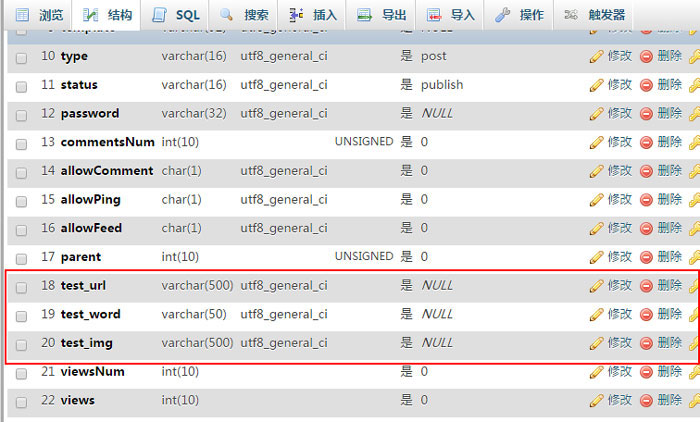
2、在Typecho数据库文章表中添加新字段
在数据表 typecho_contents 中新建一个 test_url、test_word、test_img 三个字段,类型可为字符串;
3、修改Typecho系统文件(不爱动手的小伙伴可以下载下面修改好的系统文件,直接覆盖。)
点击下载
直接覆盖的小伙伴请忽略下面的步骤,直接跳到 创建导航栏
①后台模板文件 admin/write-post.php 表单中(大概在第21行后面)插入:
<p>
跳转链接:<input type="text" name="test_url" value="<?php $post->test_url(); ?>"/>
链接描述:<input type="text" name="test_word" value="<?php $post->test_word(); ?>"/>
链接LOGO:<input type="text" name="test_img" value="<?php $post->test_img(); ?>"/>
</p>
②在 var/Widget/Contents/Post/Edit.php 里的 writePost 函数里需要接收新字段参数:
 public function writePost()
    {
        $contents = $this->request->from('password', 'allowComment',
            'allowPing', 'allowFeed', 'slug', 'tags', 'text', 'visibility', 'test_url', 'test_word', 'test_img');
③在 var/Widget/Abstract/Contents.php 里的三个函数添加新参数:
在 insert 函数添加新参数:
   /**
     * 插入内容
     *
     * @access public
     * @param array $content 内容数组
     * @return integer
     */
    public function insert(array $content)
    {
        /** 构建插入结构 */
        $insertStruct = array(
            'title'         =>  empty($content['title']) ? NULL : htmlspecialchars($content['title']),
            'created'       =>  empty($content['created']) ? $this->options->time : $content['created'],
            'modified'      =>  $this->options->time,
            'text'          =>  empty($content['text']) ? NULL : $content['text'],
            'order'         =>  empty($content['order']) ? 0 : intval($content['order']),
            'authorId'      =>  isset($content['authorId']) ? $content['authorId'] : $this->user->uid,
            'template'      =>  empty($content['template']) ? NULL : $content['template'],
            'type'          =>  empty($content['type']) ? 'post' : $content['type'],
            'status'        =>  empty($content['status']) ? 'publish' : $content['status'],
            'password'      =>  empty($content['password']) ? NULL : $content['password'],
            'commentsNum'   =>  empty($content['commentsNum']) ? 0 : $content['commentsNum'],
            'allowComment'  =>  !empty($content['allowComment']) && 1 == $content['allowComment'] ? 1 : 0,
            'allowPing'     =>  !empty($content['allowPing']) && 1 == $content['allowPing'] ? 1 : 0,
            'allowFeed'     =>  !empty($content['allowFeed']) && 1 == $content['allowFeed'] ? 1 : 0,
            'parent'        =>  empty($content['parent']) ? 0 : intval($content['parent']),
            'test_url'         =>  empty($content['test_url']) ? NULL : $content['test_url'],
            'test_word'         =>  empty($content['test_word']) ? NULL : $content['test_word'],
            'test_img'         =>  empty($content['test_img']) ? NULL : $content['test_img']
        );
在 update 函数里构建更新结构加入新字段:
   public function update(array $content, Typecho_Db_Query $condition)
    {
        /** 首先验证写入权限 */
        if (!$this->isWriteable(clone $condition)) {
            return false;
        }

        /** 构建更新结构 */
        $preUpdateStruct = array(
            'title'         =>  empty($content['title']) ? NULL : htmlspecialchars($content['title']),
            'order'         =>  empty($content['order']) ? 0 : intval($content['order']),
            'text'          =>  empty($content['text']) ? NULL : $content['text'],
            'template'      =>  empty($content['template']) ? NULL : $content['template'],
            'type'          =>  empty($content['type']) ? 'post' : $content['type'],
            'status'        =>  empty($content['status']) ? 'publish' : $content['status'],
            'password'      =>  empty($content['password']) ? NULL : $content['password'],
            'allowComment'  =>  !empty($content['allowComment']) && 1 == $content['allowComment'] ? 1 : 0,
            'allowPing'     =>  !empty($content['allowPing']) && 1 == $content['allowPing'] ? 1 : 0,
            'allowFeed'     =>  !empty($content['allowFeed']) && 1 == $content['allowFeed'] ? 1 : 0,
            'parent'        =>  empty($content['parent']) ? 0 : intval($content['parent']),
            'test_url'      =>  empty($content['test_url']) ? NULL : $content['test_url'],
            'test_word'     =>  empty($content['test_word']) ? NULL : $content['test_word'],
            'test_img'      =>  empty($content['test_img']) ? NULL : $content['test_img']
        );
在 select 函数里添加查询新字段:
/**
 * 获取查询对象
 *
 * @access public
 * @return Typecho_Db_Query
 */
public function select()
{
    return $this->db->select('table.contents.cid', 'table.contents.title', 'table.contents.slug', 'table.contents.created', 'table.contents.authorId',
    'table.contents.modified', 'table.contents.type', 'table.contents.status', 'table.contents.text', 'table.contents.commentsNum', 'table.contents.order',
    'table.contents.template', 'table.contents.password', 'table.contents.allowComment', 'table.contents.allowPing', 'table.contents.allowFeed',
    'table.contents.parent','table.contents.test_url','table.contents.test_word','table.contents.test_img')->from('table.contents');
}
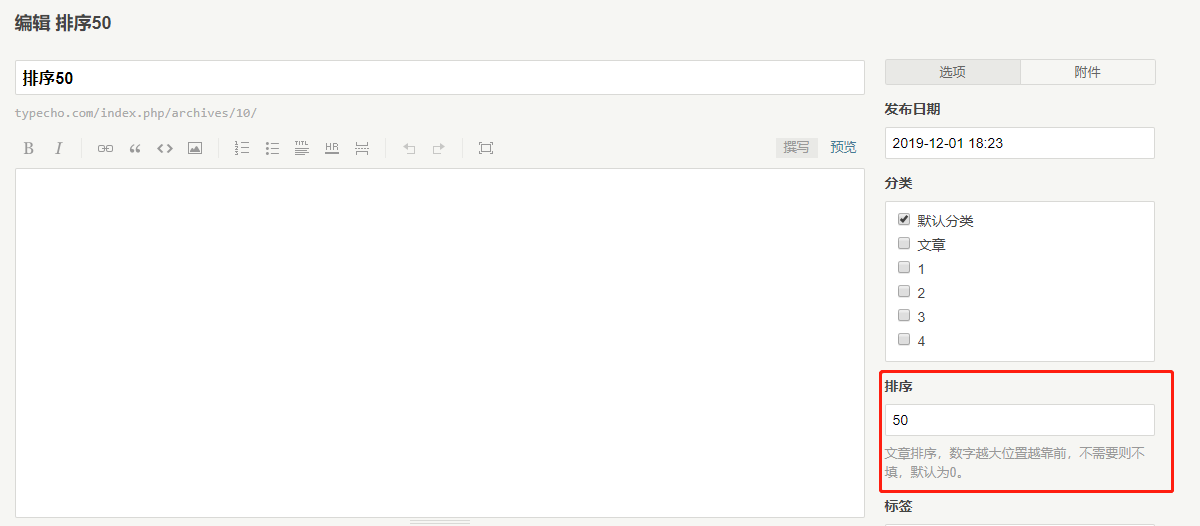
上面步骤操作完成后,撰写文章页面如下图

到这里主题安装完毕。
创建导航栏
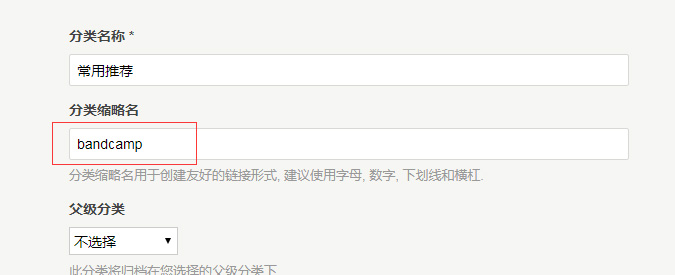
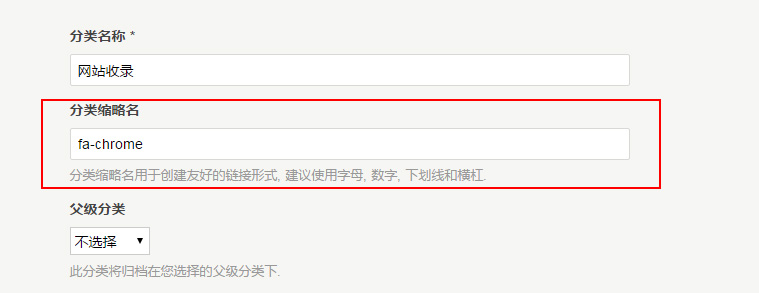
关于导航栏的创建,只要新建分类即可
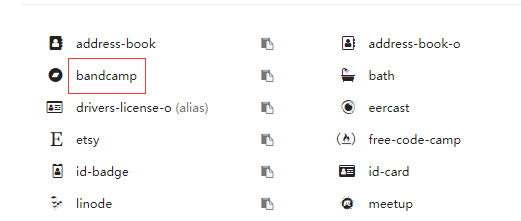
导航栏标题前面的图标请在分类缩略名中填入,图标样式请参考
http://fontawesome.dashgame.com/
为了不打击本屌的开发积极性,转载请注明出处.
如果喜欢,在下面留个言呗.
The end.
]]>